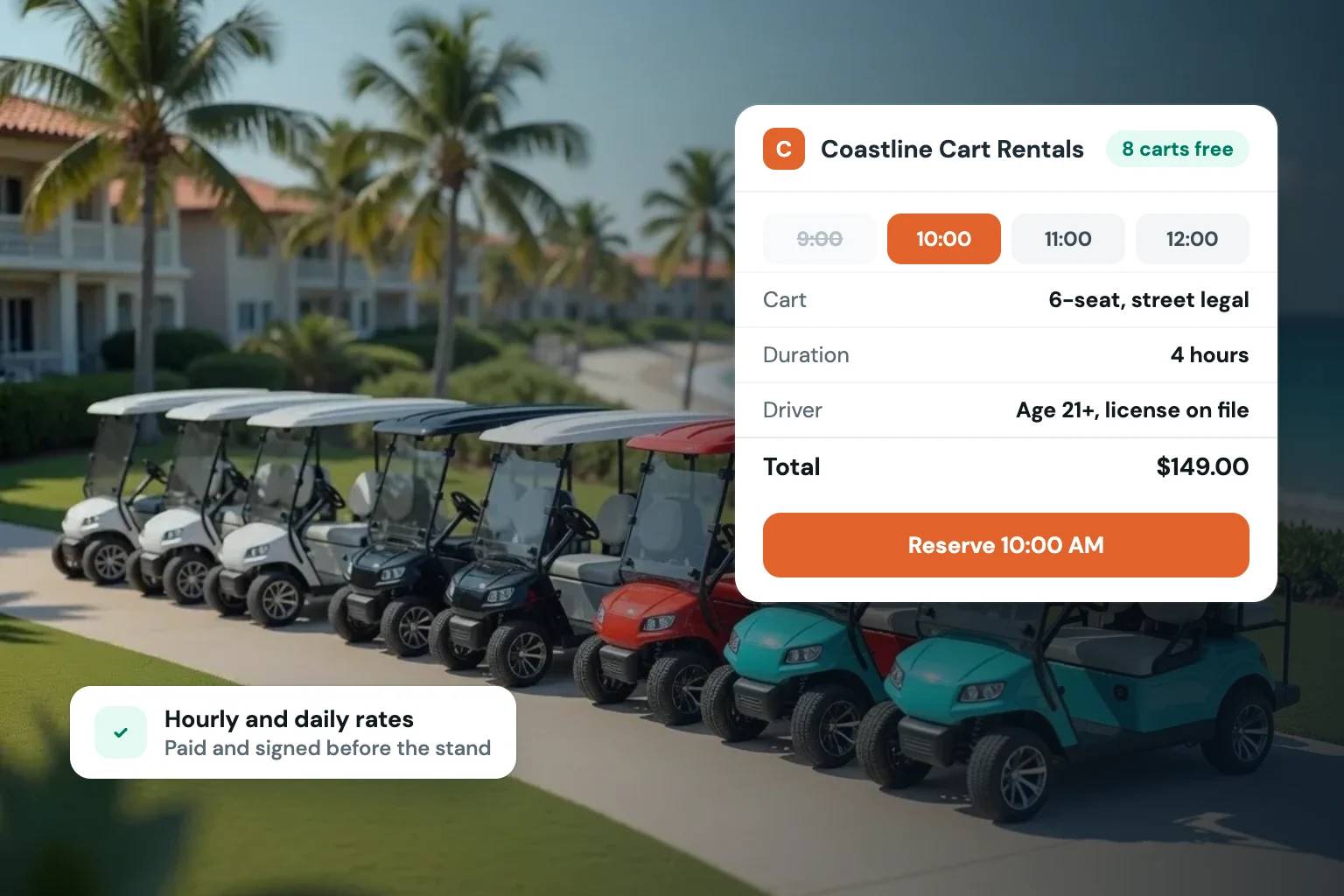
A missed weekend reservation can cost more than the rental itself. When a customer has to call, wait for a text reply, send payment separately, and sign paperwork at pickup, there are too many chances for the booking to fall through. Golf cart rental software with online booking gives operators a cleaner way to turn website traffic into confirmed reservations while keeping the controls that matter at hand. To see it in practice, here is how Fleetwire’s golf cart rental software handles hourly and daily cart bookings.
For a golf cart or LSV rental business, the booking process is part of the operation. Customers may need carts for a resort stay, neighborhood transportation, a wedding venue, a campground, a sporting event, or a multi-day vacation. They expect to see availability, choose dates, understand the price, and reserve online. The operator needs to know the right cart is held, the customer is identified, payment is secured, and the rental agreement is completed before handoff.
What Golf Cart Rental Software Should Handle
A booking tool that only collects an inquiry does not solve the operating problem. It may create more follow-up work: checking dates manually, confirming the cart, sending a payment request, chasing a deposit, and locating a signed agreement when the customer arrives.
The better approach is software built around a reservation workflow. A customer selects an available unit or cart category, chooses rental dates, enters required details, accepts pricing and policies, and completes the required checkout steps. The reservation then appears on a calendar tied to the actual fleet inventory.
That process matters even for a small fleet. A five-cart business can lose control of availability quickly when one cart is in maintenance, another is reserved for a delivery window, and a third is extending a current rental. As the fleet grows, manual coordination becomes a daily bottleneck rather than an occasional inconvenience.
Availability must reflect the real fleet
Golf cart rentals often involve more than a start and end date. Delivery and pickup windows can affect when a cart is truly available. So can charging, cleaning, inspections, repairs, and customer extensions. Your booking system should give you a clear calendar view by unit and prevent overlapping reservations.
If you list carts on other channels, calendar synchronization is equally important. A synchronized calendar helps avoid accepting the same cart twice. It also gives operators a practical way to keep direct bookings and marketplace activity visible in one operating view.
Checkout should secure the reservation, not just request it
A reservation is stronger when the transaction requirements happen before pickup. That usually includes collecting payment, placing a card hold or deposit according to your policies, verifying the renter’s identity, and getting an e-signed rental agreement.
The exact setup depends on your market. A low-speed vehicle business with higher-value units may need different deposit rules than a campground cart operation with standardized daily rentals. The software should let you set those controls without forcing every rental through the same rigid process.
Build a Direct Booking Flow Around How You Rent
The most useful golf cart rental booking software supports the way customers actually shop. A polished branded storefront helps customers understand what you offer before they contact you. Each listing should make the rental decision easier: clear cart photos, seating capacity, rental duration options, pricing, delivery details, pickup instructions, and any location or age requirements you choose to display.
This is not only about appearance. Clear listings reduce repetitive questions and help filter out poor-fit inquiries. A customer booking a six-passenger cart for a family weekend should not have to text for basic specifications. They should be able to select the right unit, see the total price, and move through checkout with confidence.
Price for the reservation you want to receive
Golf cart rental pricing is rarely a single flat number. Operators may charge by the day, offer multi-day discounts, add delivery fees, collect refundable deposits, or apply taxes based on location. Special events and holiday weekends may justify different rates from a midweek rental.
Look for software that puts those pricing rules into the booking flow. When the system calculates the total at checkout, customers know what they are agreeing to and your team spends less time explaining charges after the fact.
There is a trade-off here. Highly detailed rate structures can reflect your business closely, but too many exceptions can make both setup and customer checkout harder. Start with the pricing rules you use consistently, then add complexity only when it produces a clear operational or revenue benefit.
Keep customer communication tied to reservations
After checkout, renters still need practical information: confirmation details, delivery timing, pickup instructions, rules for charging, and a contact method if plans change. Sending these details from the reservation record keeps communication connected to the correct cart and dates.
That matters when your calendar is busy. A message about extending Cart 12 should not live in a personal text thread with no record of the original booking, payment status, or agreement. Reservation-based communication gives the team context before responding.
Choose Software for Control, Not Just Convenience
Many operators begin with a contact form, a payment app, and a calendar. That can work when demand is light, but it puts the burden on the operator to connect every step. The customer experience also depends on how quickly someone is available to reply.
A dedicated system centralizes the workflow: storefront, inventory listings, availability, checkout, payments, deposits, identity checks, agreements, taxes, and reservation records. The goal is not to add software for its own sake. It is to eliminate the gaps between the tools that create missed details, delayed confirmations, and inconsistent customer handling.
For independent operators, brand control is another practical consideration. A customer who lands on your own site should be booking from your business, with your cart inventory, policies, and visual identity. You own the customer relationship and can build a repeatable direct sales channel instead of treating every reservation as a one-off transaction.
Fleetwire is designed for this kind of direct rental operation, combining a branded booking storefront with rental-specific checkout controls such as deposits, ID verification, e-signed agreements, and inventory calendars. Its calendar sync with Turo can also help operators keep availability aligned across channels, without paying a per-booking commission on direct reservations.
Questions to Ask Before You Commit
Before selecting a platform, walk through a real reservation from the customer’s perspective and then from the counter or delivery team’s perspective. The right choice should answer operational questions, not just provide attractive booking widgets.
Consider whether the system can support the following four needs:
- Can customers reserve the correct cart, for the correct dates, without waiting for manual confirmation?
- Can you require payment, a deposit or card hold, identity verification, and an agreement before releasing the unit?
- Can you see every cart’s status and prevent calendar conflicts across your active sales channels?
- Can you control your storefront, rates, taxes, policies, and customer communications without relying on disconnected tools?
Also consider how much setup your operation can realistically handle. A feature-rich platform is not automatically a better fit if it requires a level of technical administration your team does not need. On the other hand, a basic scheduling tool may become expensive in staff time when you have to bolt on payment collection, agreements, and verification elsewhere.
A practical trial is more revealing than a feature checklist. Create a few cart listings, set up representative pricing, place a test reservation, and review what your team sees afterward. Pay attention to the handoff: can a staff member quickly confirm the renter, payment status, deposit, agreement, and assigned cart?
Make Every Reservation Easier to Operate
The best booking flow does not make your business feel automated at the expense of service. It removes the repetitive coordination that prevents your team from being responsive when customers genuinely need help. Customers get a professional path to reserve, and operators get a documented reservation before a cart leaves the lot.
Start with the booking steps that currently create the most back-and-forth. Whether that is checking availability, collecting deposits, signing agreements, or organizing delivery details, fixing that one point of friction can make the next busy weekend far easier to manage.